
install.packages(c("dplyr", "tidyr", "readr", "ggplot2", "purrr", "forcats", "broom", "here"))

# or the whole bundle in one go (bigger download)
# install.packages("tidyverse")R: Module 2 Data wrangling, visualization, and first models
hpc
r
Reshape, summarize, plot, and model the red spruce dataset with the tidyverse
Goal
In Module 1 you learned to load, inspect, subset, and summarize the red spruce fitness-trait dataset with base R, and you wrote your first reproducible script. Module 2 does the same kinds of jobs with the tidyverse: a set of packages built for data wrangling (dplyr, tidyr), plotting (ggplot2), and repeating tasks (purrr). You will also fit your first statistical models.
By the end you will have a second script, src/02_wrangle_model_traits.R, that turns data/raw/ into a set of tables, publication-style figures, and model summaries in results/, all with one Rscript call.
Prerequisites
- Completed Module 1 (you can read the file, use
str(),table(),aggregate(), and save toresults/) - R (>= 4.2), because the native pipe
|>and the\(x)shorthand for functions need R 4.1 or newer - The dataset at
data/raw/red_spruce_fitness_traits.txt, and the samecluster-exercise/project layout as Module 1
Install the packages once (on the cluster, inside the R module you loaded in Module 1):
TipCode reproducibility check
Installing is a one-time step, so it never goes inside your analysis script. The script only loads packages with library(). If a collaborator does not have a package, library() fails right away with a clear error. That is much better than the script quietly installing something into their system.
At the end of every script, sessionInfo() prints your R version and the version of every loaded package. Save that output with your results and anyone can see exactly which software produced them. Have you ever had code that worked last year and breaks today? Package versions are usually why.
ImportantProject directory setup
This exercise uses the same structure as Module 1. New in this module: a results/figures/ subfolder, so plots stay separate from tables.
cluster-exercise/
 ├── data/
 │   └── raw/            # downloaded, unchanged source data
 ├── logs/               # Slurm standard output and error logs
 ├── results/            # tables created by R
 │   └── figures/        # plots created by R
 └── src/                # R and Slurm scripts
     ├── 01_explore_traits.R
     └── 02_wrangle_model_traits.R
Learning objectives
By the end of this module you should be able to:
- Load packages and handle name conflicts between them (
dplyr::filtervsstats::filter) - Read data with
readrand explain how a tibble differs from a data frame - Chain the five core
dplyrverbs (filter,select,mutate,arrange,summarise) with the pipe|> - Compute grouped summaries with
group_by()andacross() - Reshape data between wide and long formats with
tidyr - Join a tree-level table to a population-level table
- Write your own functions and repeat them over many traits with
purrr::map() - Build layered plots with
ggplot2and save them withggsave() - Fit and interpret a linear model with
lm(), and see how a confounding variable changes the answer - Extend your reproducible script to wrangle, plot, model, and save
R quick reference
| Function/operator | Package | Purpose | Example |
|---|---|---|---|
|> |
base | Pass the left side into the first argument on the right | traits |> head() |
read_tsv() |
readr | Read a tab-delimited file as a tibble | read_tsv("data/raw/file.txt") |
glimpse() |
dplyr | Compact, sideways str() |
glimpse(traits) |
filter() |
dplyr | Keep rows that match a condition | filter(traits, Region == "E") |
select() |
dplyr | Keep or drop columns | select(traits, Population, Height) |
mutate() |
dplyr | Create or change columns | mutate(traits, elev_km = Elevation / 1000) |
arrange() |
dplyr | Sort rows (desc() for descending) |
arrange(traits, desc(Fitness)) |
group_by() + summarise() |
dplyr | One summary row per group | group_by(traits, Region) |> summarise(n = n()) |
count() |
dplyr | Shortcut for group + count | count(traits, Region) |
across() |
dplyr | Apply the same function to many columns | summarise(across(c(Height, Fitness), mean)) |
case_when() |
dplyr | Vectorized if/else for new categories | case_when(Elevation < 500 ~ "low", ...) |
left_join() |
dplyr | Add columns from a second table by a key | left_join(trees, pops, by = "Population") |
distinct() |
dplyr | Unique rows | distinct(traits, Population, Region) |
pivot_longer() / pivot_wider() |
tidyr | Reshape wide ↔︎ long | pivot_longer(traits, c(Height, Fitness)) |
drop_na() |
tidyr | Drop rows with NA in given columns | drop_na(traits, Fitness) |
fct_relevel() |
forcats | Set the order of factor levels | fct_relevel(Region, "C", "M", "E") |
map() + list_rbind() |
purrr | Apply a function to each element, stack the results | map(traits_vec, f) |> list_rbind() |
ggplot() + aes() + geom_*() |
ggplot2 | Layered plotting | ggplot(traits, aes(Region, Height)) + geom_boxplot() |
facet_wrap() |
ggplot2 | Small multiples, one panel per group | + facet_wrap(~ trait, scales = "free_y") |
ggsave() |
ggplot2 | Save a ggplot to a file | ggsave("results/figures/p.png", p) |
lm() |
stats | Fit a linear model | lm(Fitness ~ Elevation, data = traits) |
tidy() / glance() |
broom | Model output as tibbles | broom::tidy(fit) |
Setting up the session
Start R in the project root exactly as in Module 1 (cd ~/projects/cluster-exercise, load the R module, R), then load the packages:
library(dplyr)
library(tidyr)
library(readr)
library(ggplot2)
library(purrr)
library(forcats)

here::here()   # confirm the project root before reading anything
[1] "/Users/anoobprakash/Documents/GitHub/anoobvinu07.github.io"dir.create(here::here("results/figures"), recursive = TRUE, showWarnings = FALSE)Reading data with readr
traits <- read_tsv(here::here("data/raw/red_spruce_fitness_traits.txt"),
                   show_col_types = FALSE)

traits          # printing a tibble shows only what fits on screen
# A tibble: 326 × 19
Family Population Tree Location Region Latitude Longitude SeedWeight
<chr> <chr> <dbl> <chr> <chr> <dbl> <dbl> <dbl>
1 AB_05 AB 5 TN E 35.6 83.5 0.00387
2 AB_08 AB 8 TN E 35.6 83.5 0.00470
3 AB_12 AB 12 TN E 35.5 83.5 0.00418
4 AB_16 AB 16 TN E 35.5 83.5 0.00348
5 ALB_01 ALB 1 ME C 44.3 70.8 0.00274
6 ALB_02 ALB 2 ME C 44.3 70.8 0.00444
7 ALB_03 ALB 3 ME C 44.3 70.8 0.00313
8 ALB_05 ALB 5 ME C 44.3 70.8 0.00355
9 ALB_06 ALB 6 ME C 44.3 70.8 0.00356
10 APP_01 APP 1 VT C 44.2 72.9 0.00224
# ℹ 316 more rows
# ℹ 11 more variables: Germination <dbl>, Survival <dbl>, Height <dbl>,
# Fitness <dbl>, Elevation <dbl>, PC1 <dbl>, PC2 <dbl>,
# Family_Homozygosity <dbl>, Population_Homozygosity <dbl>,
# Genetic_Diversity <dbl>, Genetic_Load <dbl>glimpse(traits) # one line per column: name, type, first valuesRows: 326
Columns: 19
$ Family <chr> "AB_05", "AB_08", "AB_12", "AB_16", "ALB_01", …
$ Population <chr> "AB", "AB", "AB", "AB", "ALB", "ALB", "ALB", "…
$ Tree <dbl> 5, 8, 12, 16, 1, 2, 3, 5, 6, 1, 2, 3, 4, 5, 6,…
$ Location <chr> "TN", "TN", "TN", "TN", "ME", "ME", "ME", "ME"…
$ Region <chr> "E", "E", "E", "E", "C", "C", "C", "C", "C", "…
$ Latitude <dbl> 35.55297, 35.55212, 35.53890, 35.53882, 44.306…
$ Longitude <dbl> 83.49438, 83.49259, 83.49463, 83.49534, 70.840…
$ SeedWeight <dbl> 0.003868, 0.004702, 0.004182, 0.003484, 0.0027…
$ Germination <dbl> 0.14, 0.04, 0.20, 0.36, 0.78, 0.66, 0.66, 0.72…
$ Survival <dbl> 0.9230769, 0.6923077, 0.9333333, 0.8666667, 1.…
$ Height <dbl> 27.32543, 31.14205, 29.61083, 31.97449, 23.421…
$ Fitness <dbl> 3.5312860, 0.8623953, 5.5273541, 9.9760420, 18…
$ Elevation <dbl> 1812, 1785, 1750, 1738, 455, 524, 523, 573, 58…
$ PC1 <dbl> -0.044620267, -0.039470358, -0.042973187, -0.0…
$ PC2 <dbl> -0.05689514, -0.07471556, -0.05978979, -0.0605…
$ Family_Homozygosity <dbl> 0.9063498, 0.8878673, 0.8783499, 0.9183347, 0.…
$ Population_Homozygosity <dbl> 0.010900911, 0.010900911, 0.010900911, 0.01090…
$ Genetic_Diversity <dbl> 0.09649039, 0.09649039, 0.09649039, 0.09649039…
$ Genetic_Load <dbl> 1.014863, 1.014863, 1.014863, 1.014863, 1.0034…read_tsv() is the readr version of read.delim(). It returns a tibble, which is a data frame with stricter and friendlier behavior. A tibble is a data frame, so everything from Module 1 ($, [ , ], nrow()) still works.
Making Region a meaningful factor
The three region codes describe where each population sits in the red spruce range: Core (the northern center of the range), Margin (Pennsylvania), and Edge (the southern Appalachians). R sorts factor levels alphabetically (C, E, M), which mixes up that geography. Mean latitude runs C 43.7°, M 41.2°, E 37.6°, so the order north to south is C → M → E. Let’s use that order:
traits <- traits |>
  mutate(Region = fct_relevel(factor(Region), "C", "M", "E"))

levels(traits$Region)
[1] "C" "M" "E"From now on every table, boxplot, and model lists regions north to south. You choose this order once, near the top of the script, and it is used everywhere after that.
Wrangling with dplyr
The pipe, revisited
In Module 1 you met |> as a way to tack head() onto the end of a command. Its real job is to turn nested code into a sequence you read from top to bottom:
# Nested: read from the inside out
head(arrange(filter(traits, Region == "E"), desc(Fitness)), 3)
# A tibble: 3 × 19
Family Population Tree Location Region Latitude Longitude SeedWeight
<chr> <chr> <dbl> <chr> <fct> <dbl> <dbl> <dbl>
1 CRA_05 CRA 5 WV E 38.2 80.3 0.00452
2 XCV_03 XCV 3 WV E 39.1 79.5 0.00307
3 CRA_04 CRA 4 WV E 38.2 80.3 0.00349
# ℹ 11 more variables: Germination <dbl>, Survival <dbl>, Height <dbl>,
# Fitness <dbl>, Elevation <dbl>, PC1 <dbl>, PC2 <dbl>,
# Family_Homozygosity <dbl>, Population_Homozygosity <dbl>,
# Genetic_Diversity <dbl>, Genetic_Load <dbl># Piped: read top to bottom, "then ... then ... then"
traits |>
filter(Region == "E") |>
arrange(desc(Fitness)) |>
head(3)# A tibble: 3 × 19
Family Population Tree Location Region Latitude Longitude SeedWeight
<chr> <chr> <dbl> <chr> <fct> <dbl> <dbl> <dbl>
1 CRA_05 CRA 5 WV E 38.2 80.3 0.00452
2 XCV_03 XCV 3 WV E 39.1 79.5 0.00307
3 CRA_04 CRA 4 WV E 38.2 80.3 0.00349
# ℹ 11 more variables: Germination <dbl>, Survival <dbl>, Height <dbl>,
# Fitness <dbl>, Elevation <dbl>, PC1 <dbl>, PC2 <dbl>,
# Family_Homozygosity <dbl>, Population_Homozygosity <dbl>,
# Genetic_Diversity <dbl>, Genetic_Load <dbl>Both lines give the same result. x |> f(y) is just another way to write f(x, y): the left side becomes the first argument of the function on the right. Every dplyr verb takes a data frame as its first argument and returns a data frame, which is why the verbs chain so neatly.
Tip
|> or %>%?
You will see %>% (from the magrittr package) in older tutorials and Stack Overflow answers. For everything in this module the two behave the same. |> is built into R, so it needs no package, and it is what we use here.
The five core verbs
traits |> filter(Region == "E", Fitness > 20)# A tibble: 10 × 19
Family Population Tree Location Region Latitude Longitude SeedWeight
<chr> <chr> <dbl> <chr> <fct> <dbl> <dbl> <dbl>
1 BRB_04 BRB 4 WV E 39.1 79.6 0.00393
2 CRA_02 CRA 2 WV E 38.2 80.3 0.00394
3 CRA_04 CRA 4 WV E 38.2 80.3 0.00349
4 CRA_05 CRA 5 WV E 38.2 80.3 0.00452
5 KOS_01 KOS 1 WV E 38.7 79.5 0.00400
6 KOS_02 KOS 2 WV E 38.7 79.5 0.00436
7 PRK_04 PRK 4 WV E 38.3 80.2 0.00443
8 XCV_01 XCV 1 WV E 39.1 79.4 0.00279
9 XCV_02 XCV 2 WV E 39.1 79.5 0.00385
10 XCV_03 XCV 3 WV E 39.1 79.5 0.00307
# ℹ 11 more variables: Germination <dbl>, Survival <dbl>, Height <dbl>,
# Fitness <dbl>, Elevation <dbl>, PC1 <dbl>, PC2 <dbl>,
# Family_Homozygosity <dbl>, Population_Homozygosity <dbl>,
# Genetic_Diversity <dbl>, Genetic_Load <dbl>Comma-separated conditions are combined with AND, the same as & inside [ , ] in Module 1. Note that you write Region, not traits$Region. Inside a dplyr verb, column names are looked up in the data frame you piped in. This is called data masking.
Rows where the condition is NA are dropped, just like base-R bracket filtering.
traits |> select(Population, Region, Height, Fitness) |> head(3)# A tibble: 3 × 4
Population Region Height Fitness
<chr> <fct> <dbl> <dbl>
1 AB E 27.3 3.53
2 AB E 31.1 0.862
3 AB E 29.6 5.53 traits |> select(Family:Region) |> head(3) # a range of columns# A tibble: 3 × 5
Family Population Tree Location Region
<chr> <chr> <dbl> <chr> <fct>
1 AB_05 AB 5 TN E
2 AB_08 AB 8 TN E
3 AB_12 AB 12 TN E traits |> select(starts_with("Pop")) |> head(3) # by name pattern# A tibble: 3 × 2
Population Population_Homozygosity
<chr> <dbl>
1 AB 0.0109
2 AB 0.0109
3 AB 0.0109traits |> select(-c(PC1, PC2)) |> ncol() # drop columns[1] 17Helpers like starts_with(), ends_with(), contains(), and where(is.numeric) let you choose columns by a rule instead of typing every name.
traits |>
  mutate(elev_km   = Elevation / 1000,
         log_seed  = log(SeedWeight),
         tall      = Height > 35) |>
  select(Population, Elevation, elev_km, SeedWeight, log_seed, Height, tall) |>
  head(3)
# A tibble: 3 × 7
Population Elevation elev_km SeedWeight log_seed Height tall
<chr> <dbl> <dbl> <dbl> <dbl> <dbl> <lgl>
1 AB 1812 1.81 0.00387 -5.56 27.3 FALSE
2 AB 1785 1.78 0.00470 -5.36 31.1 FALSE
3 AB 1750 1.75 0.00418 -5.48 29.6 FALSEmutate() keeps all existing columns and adds new ones at the end. A column created early in a mutate() call can be used further down the same call.
traits |> arrange(Region, desc(Height)) |> select(Family, Region, Height) |> head(4)# A tibble: 4 × 3
Family Region Height
<chr> <fct> <dbl>
1 BAL_01 C 45.2
2 OWL_01 C 38.1
3 MSK_03 C 37.7
4 BAL_05 C 37.2The first column sorts first, and the second column breaks ties. desc() reverses the order. This replaces Module 1’s order(-x) trick, and it also works on text columns.
traits |>
  summarise(n_trees     = n(),
            mean_height = mean(Height, na.rm = TRUE),
            sd_height   = sd(Height, na.rm = TRUE))
# A tibble: 1 × 3
n_trees mean_height sd_height
<int> <dbl> <dbl>
1 326 30.0 4.64summarise() reduces many rows to one. On its own that is like mean(). It gets useful when you pair it with group_by().
Grouped summaries
traits |>
  group_by(Region) |>
  summarise(n_trees      = n(),
            n_pops       = n_distinct(Population),
            mean_fitness = mean(Fitness, na.rm = TRUE),
            sd_fitness   = sd(Fitness, na.rm = TRUE),
            .groups = "drop")
# A tibble: 3 × 5
Region n_trees n_pops mean_fitness sd_fitness
<fct> <int> <int> <dbl> <dbl>
1 C 178 32 14.6 6.60
2 M 47 9 19.8 7.54
3 E 101 22 10.5 6.50group_by() changes nothing you can see. It tags the data so that the next verb runs once per group. Compare this with Module 1: one group_by() |> summarise() call replaces a separate tapply() for each statistic, and it returns a tidy table instead of a named vector.
count() is the shortcut for the most common grouped summary, the number of rows:
traits |> count(Region)# A tibble: 3 × 2
Region n
<fct> <int>
1 C 178
2 M 47
3 E 101traits |> count(Region, Location) # two-way: every Region × state combination# A tibble: 12 × 3
Region Location n
<fct> <chr> <int>
1 C MA 19
2 C ME 16
3 C NB 6
4 C NH 23
5 C NY 53
6 C VT 61
7 M PA 47
8 E MD 10
9 E NC 22
10 E TN 14
11 E VA 5
12 E WV 50Many columns at once with across()
Summarizing five traits one at a time means typing mean(..., na.rm = TRUE) five times. across() applies one function, or several, to a whole set of columns:
fitness_traits <- c("SeedWeight", "Germination", "Survival", "Height", "Fitness")

traits |>
  group_by(Region) |>
  summarise(across(all_of(fitness_traits), \(x) mean(x, na.rm = TRUE)),
            .groups = "drop")
# A tibble: 3 × 6
Region SeedWeight Germination Survival Height Fitness
<fct> <dbl> <dbl> <dbl> <dbl> <dbl>
1 C 0.00325 0.566 0.819 29.7 14.6
2 M 0.00305 0.647 0.820 34.0 19.8
3 E 0.00338 0.391 0.897 28.9 10.5New categories with case_when()
Elevation is continuous, but sometimes you want bands. case_when() is a vectorized if/else: conditions are checked in order, and the first one that is TRUE wins:
traits <- traits |>
  mutate(elev_class = case_when(
           Elevation < 500  ~ "low",
           Elevation < 1000 ~ "mid",      # only reached if Elevation >= 500
           Elevation >= 1000 ~ "high"
         ),
         elev_class = factor(elev_class, levels = c("low", "mid", "high")))

traits |> count(elev_class)
# A tibble: 4 × 2
elev_class n
<fct> <int>
1 low 24
2 mid 180
3 high 119
4 <NA> 3Reshaping with tidyr
Wide vs long
The dataset is wide: each fitness trait has its own column. That suits one-trait-at-a-time work, but many tasks are easier when the data is long, with one row per tree × trait pair:
traits_long <- traits |>
  select(Family, Population, Region, all_of(fitness_traits)) |>
  pivot_longer(cols      = all_of(fitness_traits),
               names_to  = "trait",
               values_to = "value")

traits_long
# A tibble: 1,630 × 5
Family Population Region trait value
<chr> <chr> <fct> <chr> <dbl>
1 AB_05 AB E SeedWeight 0.00387
2 AB_05 AB E Germination 0.14
3 AB_05 AB E Survival 0.923
4 AB_05 AB E Height 27.3
5 AB_05 AB E Fitness 3.53
6 AB_08 AB E SeedWeight 0.00470
7 AB_08 AB E Germination 0.04
8 AB_08 AB E Survival 0.692
9 AB_08 AB E Height 31.1
10 AB_08 AB E Fitness 0.862
# ℹ 1,620 more rowsdim(traits_long)[1] 1630 5pivot_wider() goes the other way. A common use is turning a long summary into a table that is easy to read:
traits_long |>
  group_by(Region, trait) |>
  summarise(mean = mean(value, na.rm = TRUE), .groups = "drop") |>
  pivot_wider(names_from = Region, values_from = mean)
# A tibble: 5 × 4
trait C M E
<chr> <dbl> <dbl> <dbl>
1 Fitness 14.6 19.8 10.5
2 Germination 0.566 0.647 0.391
3 Height 29.7 34.0 28.9
4 SeedWeight 0.00325 0.00305 0.00338
5 Survival 0.819 0.820 0.897 Traits are rows and regions are columns. This is the shape a manuscript table usually takes.
Joining tables
Look at the genetic-parameter columns. Population_Homozygosity, Genetic_Diversity, and Genetic_Load have one value per population, repeated on every tree from that population. They are population-level variables stored in a tree-level table. You can pull them out into their own table:
pop_genetics <- traits |>
  distinct(Population, Region, Population_Homozygosity, Genetic_Diversity, Genetic_Load)

nrow(pop_genetics)   # one row per population
[1] 63Exactly 63 rows, one per population. If any population had two different values, distinct() would have returned more than 63 rows, so this is also a check that the data is consistent. (Family_Homozygosity, as the name says, differs between families, so it stays in the tree table.)
Now build population-level trait means and join the two tables on their shared key, Population:
pop_means <- traits |>
  group_by(Population) |>
  summarise(n_trees      = n(),
            mean_fitness = mean(Fitness, na.rm = TRUE),
            mean_height  = mean(Height, na.rm = TRUE),
            mean_elev    = mean(Elevation, na.rm = TRUE),
            .groups = "drop")

pop_table <- left_join(pop_means, pop_genetics, by = "Population")
dim(pop_table)
[1] 63 9head(pop_table, 3)# A tibble: 3 × 9
Population n_trees mean_fitness mean_height mean_elev Region
<chr> <int> <dbl> <dbl> <dbl> <fct>
1 AB 4 4.97 30.0 1771. E
2 ALB 5 20.8 28.6 533. C
3 APP 6 16.4 29.6 758. C
# ℹ 3 more variables: Population_Homozygosity <dbl>, Genetic_Diversity <dbl>,
# Genetic_Load <dbl>A small hand-made lookup table is another common join, for example to swap codes for readable labels:
region_lookup <- tibble(Region      = c("C", "M", "E"),
                        region_name = c("Core", "Margin", "Edge"))

traits |>
  mutate(Region = as.character(Region)) |>   # match the key type in the lookup
  left_join(region_lookup, by = "Region") |>
  count(region_name)
# A tibble: 3 × 2
region_name n
<chr> <int>
1 Core 178
2 Edge 101
3 Margin 47The as.character() step is there because a join key should have the same type on both sides. If you join a factor key to a character key, dplyr quietly turns the result into plain character, so your carefully chosen C → M → E order disappears without warning. Match the types on purpose, then set the factor order again afterwards if you need it.
Functions and iteration
Writing your own function
You wrote a small function (stats_of()) in Module 1, Exercise 3. Here is a more general version. It takes a data frame and the name of a trait as text, and returns a one-row tibble:
trait_summary <- function(data, trait) {
  x <- data[[trait]]                      # [[ ]] pulls a column by its name as text
  stopifnot(is.numeric(x))                # stop early with a clear error if not numeric

  tibble(trait     = trait,
         n         = sum(!is.na(x)),
         n_missing = sum(is.na(x)),
         mean      = mean(x, na.rm = TRUE),
         sd        = sd(x, na.rm = TRUE),
         cv        = sd / mean)           # coefficient of variation
}

trait_summary(traits, "Height")
# A tibble: 1 × 6
trait n n_missing mean sd cv
<chr> <int> <int> <dbl> <dbl> <dbl>
1 Height 313 13 30.0 4.64 0.155Repeating a function: loop vs map()
Now run trait_summary() for all five traits. Here are two ways that give the same result:
out <- vector("list", length(fitness_traits))   # make room for the results first

for (i in seq_along(fitness_traits)) {
  out[[i]] <- trait_summary(traits, fitness_traits[i])
}

bind_rows(out)
# A tibble: 5 × 6
trait n n_missing mean sd cv
<chr> <int> <int> <dbl> <dbl> <dbl>
1 SeedWeight 314 12 0.00327 0.000791 0.242
2 Germination 314 12 0.521 0.215 0.413
3 Survival 325 1 0.843 0.231 0.274
4 Height 313 13 30.0 4.64 0.155
5 Fitness 314 12 14.0 7.32 0.523map(fitness_traits, \(tr) trait_summary(traits, tr)) |>
list_rbind()# A tibble: 5 × 6
trait n n_missing mean sd cv
<chr> <int> <int> <dbl> <dbl> <dbl>
1 SeedWeight 314 12 0.00327 0.000791 0.242
2 Germination 314 12 0.521 0.215 0.413
3 Survival 325 1 0.843 0.231 0.274
4 Height 313 13 30.0 4.64 0.155
5 Fitness 314 12 14.0 7.32 0.523map(x, f) means “call f on each element of x and return the results as a list”. It is the same loop, without the bookkeeping: no index i, and no setting up out in advance. list_rbind() stacks the list of one-row tibbles into a single table, like bind_rows() in the loop version.
TipWhich one should I use?
Both are fine. A for loop is easier to read when each step does several things (read a file, fit a model, save a plot). map() is shorter when each step is a single function call that returns a value. Choose the one you can still read six months from now.
One habit to drop: growing a result inside a loop with out <- rbind(out, new_row). R copies the whole object on every pass, so it gets slow quickly with large data (for example, thousands of SNPs). Make room first, as above, or use map().
Look at the cv column. Fitness (CV ≈ 0.52) varies far more, relative to its mean, than Height (CV ≈ 0.16). That makes sense: in this dataset Fitness is a composite built from germination, survival, and growth, so it collects variation from all three. Its correlation with Germination is 0.86.
Plotting with ggplot2
The grammar of graphics
Every ggplot2 plot has the same three parts:
- Data:
ggplot(traits, ...) - Aesthetic mappings:
aes(x = ..., y = ..., colour = ...)link columns to visual properties - Geoms:
geom_point(),geom_boxplot(), … decide how the mapped data is drawn
You add layers with + (not |>). Here is the Module 1 boxplot rebuilt layer by layer:
ggplot(traits, aes(x = Region, y = Height))
An empty panel. The axes exist because the mappings are set, but no geom has been added yet.
ggplot(traits, aes(x = Region, y = Height)) +
  geom_boxplot()
Warning: Removed 13 rows containing non-finite outside the scale range
(`stat_boxplot()`).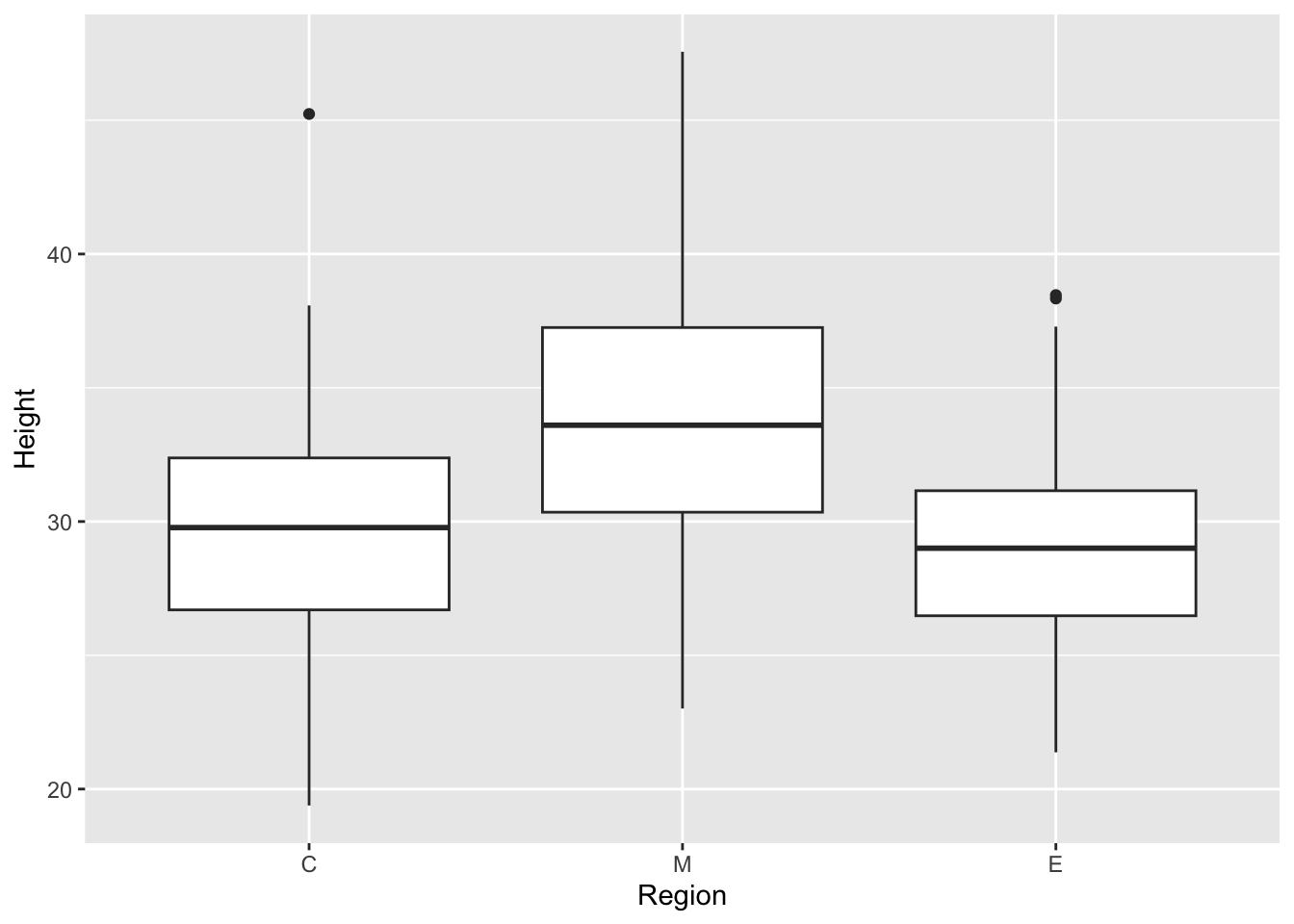
ggplot(traits, aes(x = Region, y = Height)) +
  geom_boxplot(outlier.shape = NA) +             # hide outliers; the points show them
  geom_jitter(width = 0.15, alpha = 0.4)
Warning: Removed 13 rows containing non-finite outside the scale range
(`stat_boxplot()`).Warning: Removed 13 rows containing missing values or values outside the scale range
(`geom_point()`).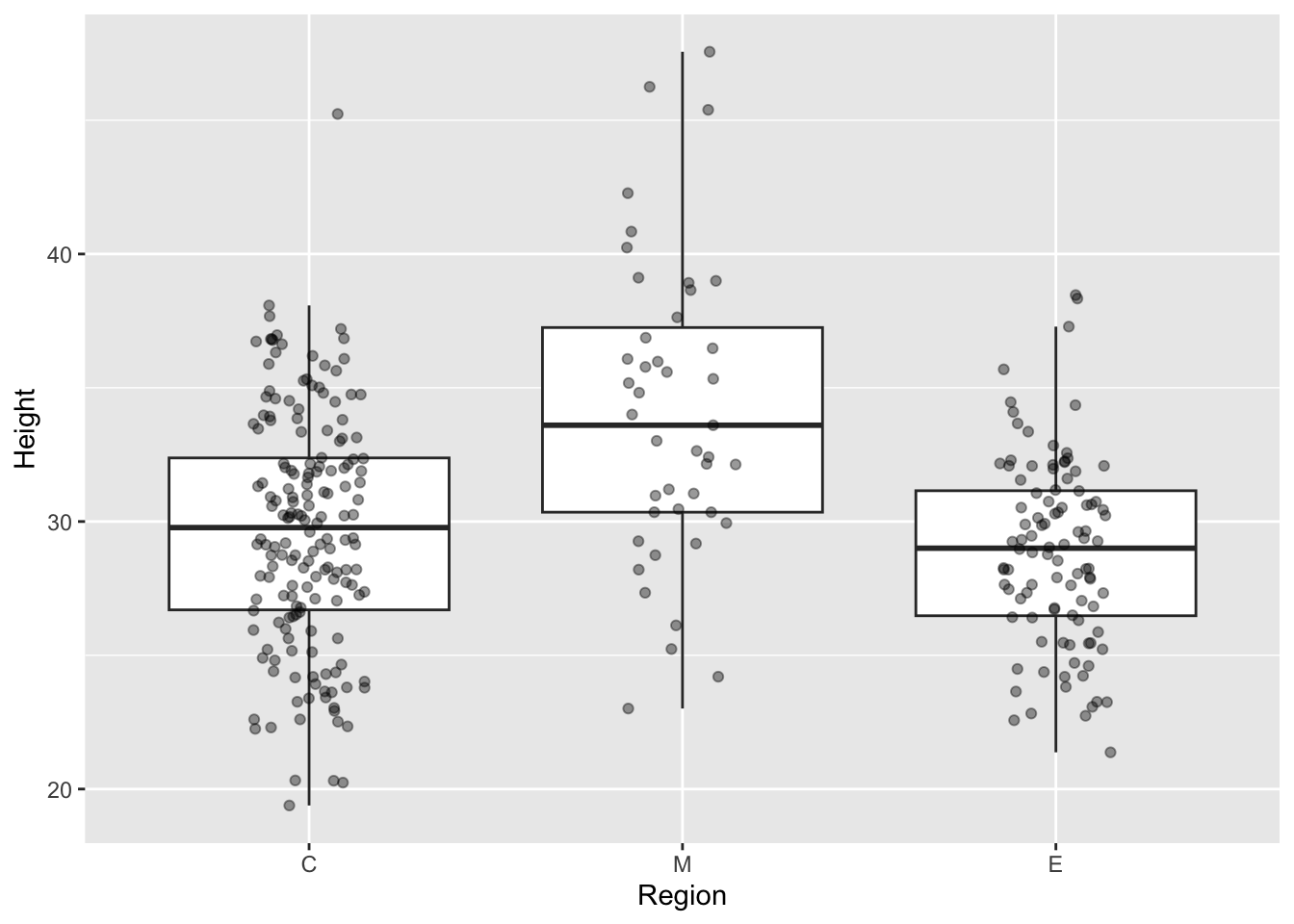
Showing the raw data under a summary is good practice. It reveals that region M has far fewer trees (47) than C (178), which a boxplot alone hides.
ggplot(traits, aes(x = Region, y = Height, fill = Region)) +
  geom_boxplot(outlier.shape = NA, alpha = 0.6) +
  geom_jitter(width = 0.15, alpha = 0.4, size = 1) +
  labs(x = "Region (north to south)", y = "Height (cm)",
       title = "Seedling height by region") +
  theme_bw() +
  theme(legend.position = "none")
Warning: Removed 13 rows containing non-finite outside the scale range
(`stat_boxplot()`).Warning: Removed 13 rows containing missing values or values outside the scale range
(`geom_point()`).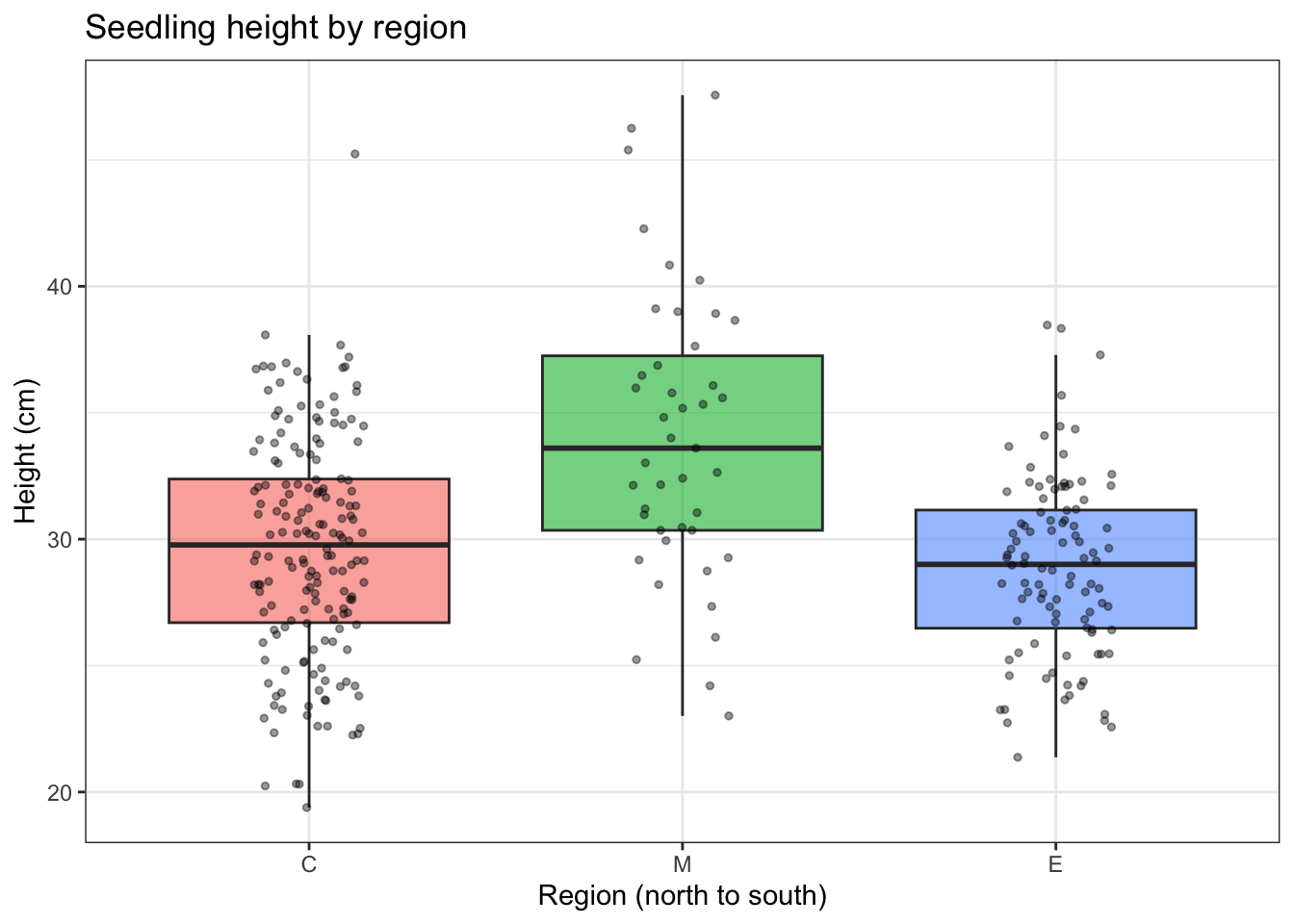
Scatterplots with a fitted line, coloured by group
ggplot(traits, aes(x = Elevation, y = Fitness)) +
  geom_point(aes(colour = Region), alpha = 0.6) +
  geom_smooth(method = "lm", formula = y ~ x, colour = "black") +
  labs(x = "Elevation (m)", y = "Fitness") +
  theme_bw()
Warning: Removed 15 rows containing non-finite outside the scale range
(`stat_smooth()`).Warning: Removed 15 rows containing missing values or values outside the scale range
(`geom_point()`).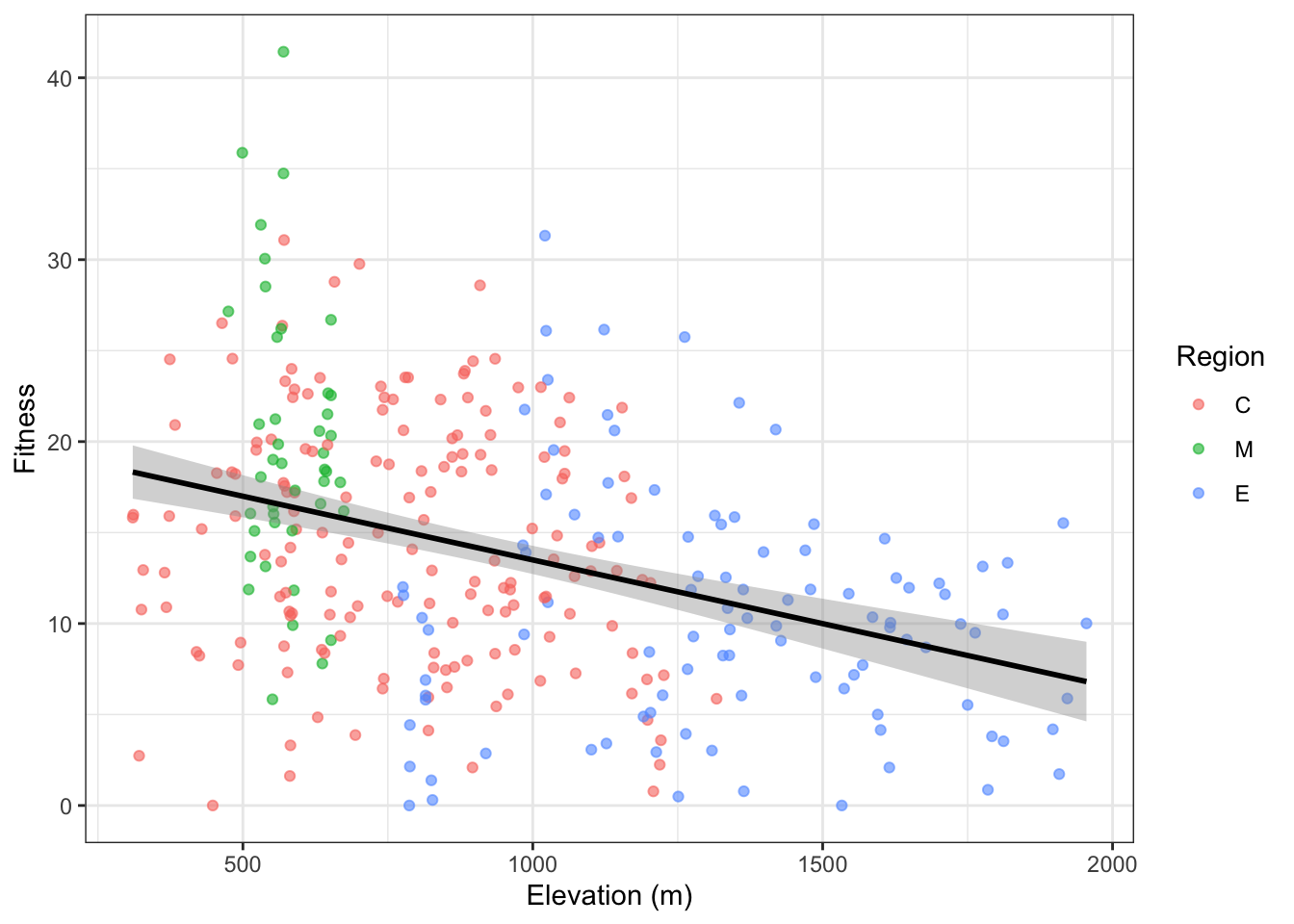
NoteCode breakdown: where
aes() goes matters
colour = Region sits inside geom_point(aes(...)), so it applies only to the points. Because the smoother does not inherit it, geom_smooth() fits one line through all trees.
Move colour = Region into the top-level ggplot(aes(...)) and every layer inherits it. You then get three lines, one per region:
ggplot(traits, aes(x = Elevation, y = Fitness, colour = Region)) +
  geom_point(alpha = 0.6) +
  geom_smooth(method = "lm", formula = y ~ x, se = FALSE) +
  labs(x = "Elevation (m)", y = "Fitness") +
  theme_bw()
Warning: Removed 15 rows containing non-finite outside the scale range
(`stat_smooth()`).Warning: Removed 15 rows containing missing values or values outside the scale range
(`geom_point()`).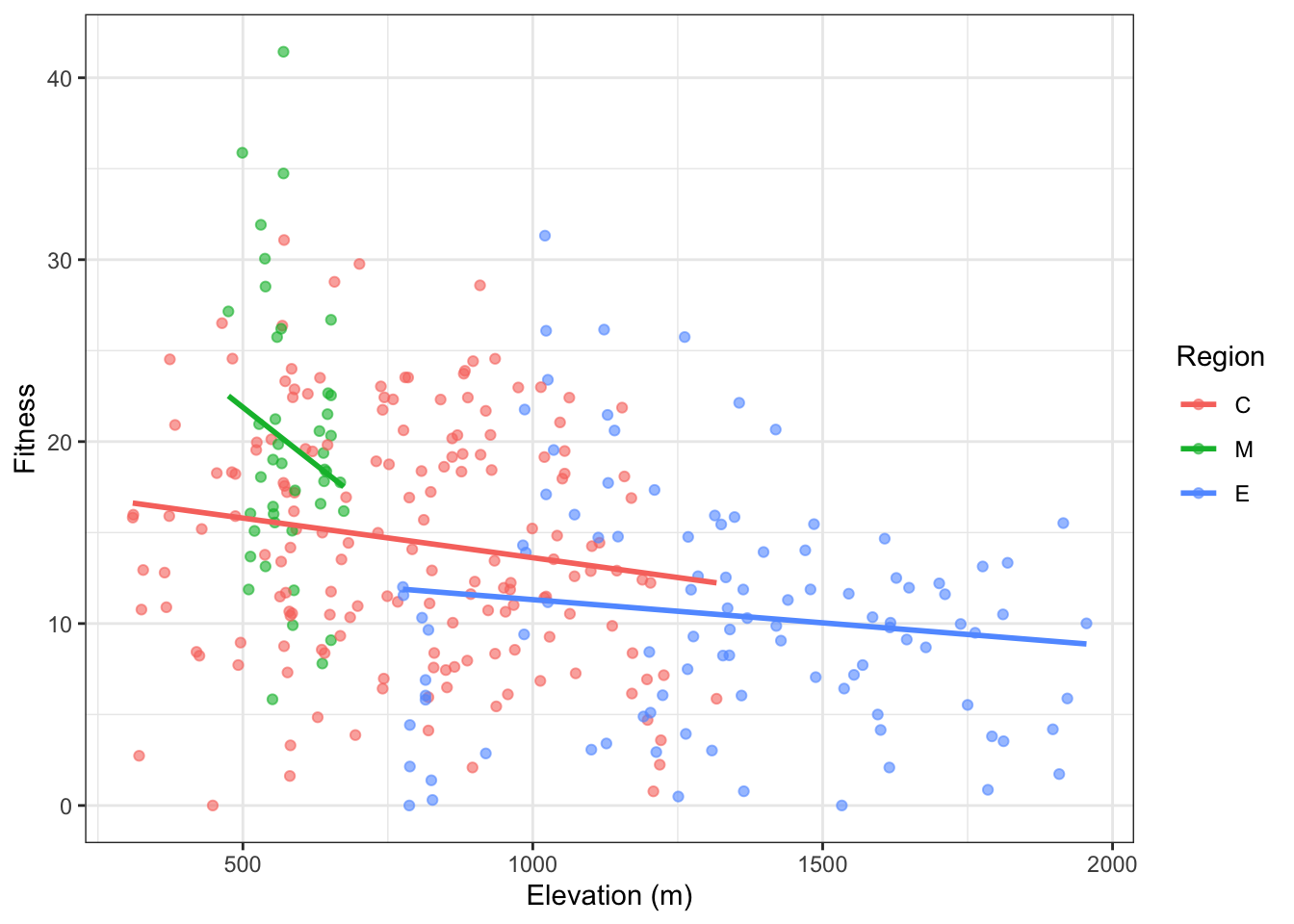
Compare the two plots. The Core and Edge lines are flatter than the single pooled line. The Margin line is steep, but it covers only about 200 m of elevation (475–674 m), so it is poorly constrained. Above all, the three regions sit at different fitness levels and cover different elevation ranges: Margin is low and fit, Edge is high and less fit. A large part of the overall downhill trend comes from the regions being different from each other, not from elevation acting within each region. The model section below puts a number on this.
Mappings in aes() link a column to a visual property. A fixed setting like colour = "black" goes outside aes(). Writing aes(colour = "black") is a classic mistake: it creates a legend entry called “black” drawn in the default red.
Small multiples with facets
The long table from the reshaping section pays off here. One plot shows every trait:
p_traits <- traits_long |>
  ggplot(aes(x = Region, y = value, fill = Region)) +
  geom_boxplot(alpha = 0.6, outlier.size = 0.8) +
  facet_wrap(~ trait, scales = "free_y", nrow = 2) +
  labs(x = NULL, y = NULL) +
  theme_bw() +
  theme(legend.position = "none")

p_traits
Warning: Removed 50 rows containing non-finite outside the scale range
(`stat_boxplot()`).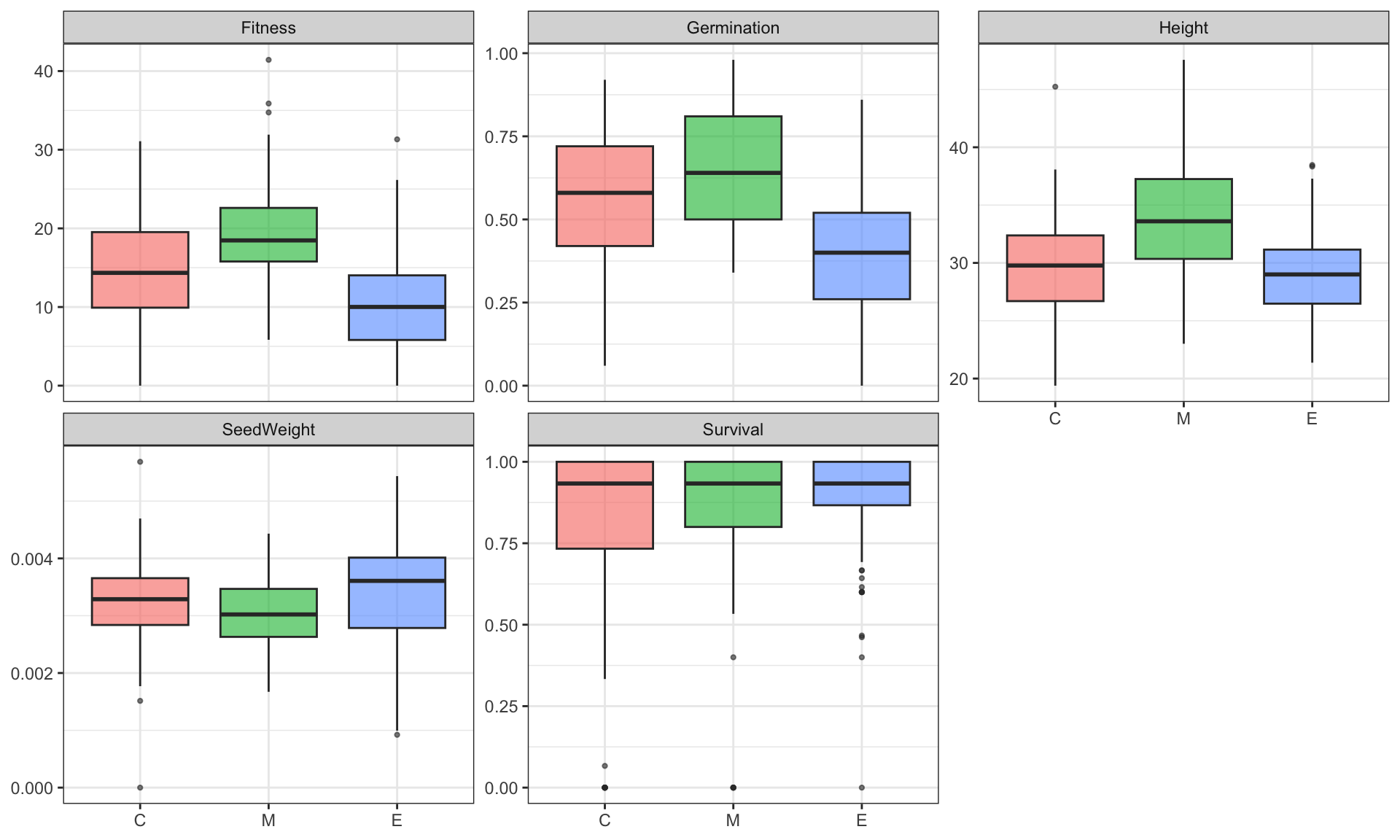
scales = "free_y" gives each panel its own y-axis. Without it, seed weight (around 0.003) would be squashed flat against height (around 30). This one call replaces five separate base-R boxplot() calls.
Saving plots with ggsave()
ggsave(here::here("results/figures/traits_by_region.png"), p_traits,
       width = 10, height = 6, dpi = 300)
Warning: Removed 50 rows containing non-finite outside the scale range
(`stat_boxplot()`).Compare this with Module 1’s png() → plot → dev.off() sequence. ggsave() takes the plot object and writes it in one step, so you cannot forget to close the device. The file type comes from the extension: .pdf gives a vector file for manuscripts, .png a raster image for slides and websites. width and height are in inches by default.
First statistical models
Correlation
cor.test(traits$Elevation, traits$Fitness)
    Pearson's product-moment correlation

data:  traits$Elevation and traits$Fitness
t = -6.8634, df = 309, p-value = 3.687e-11
alternative hypothesis: true correlation is not equal to 0
95 percent confidence interval:
 -0.4564581 -0.2631311
sample estimates:
       cor
-0.3637047
This matches Module 1: r ≈ −0.36. Now there is a 95% confidence interval (−0.46 to −0.26) and a p-value. df = 309 tells you 311 trees have both values: 326 minus those missing Fitness, Elevation, or both.
Linear regression with lm()
fit_elev <- lm(Fitness ~ Elevation, data = traits)
summary(fit_elev)
Call:
lm(formula = Fitness ~ Elevation, data = traits)

Residuals:
     Min       1Q   Median       3Q      Max
-17.3617  -5.0609   0.0885   4.6107  24.9206

Coefficients:
             Estimate Std. Error t value Pr(>|t|)
(Intercept) 20.498455   1.028311  19.934  < 2e-16 ***
Elevation   -0.007002   0.001020  -6.863 3.69e-11 ***
---
Signif. codes:  0 '***' 0.001 '**' 0.01 '*' 0.05 '.' 0.1 ' ' 1

Residual standard error: 6.85 on 309 degrees of freedom
  (15 observations deleted due to missingness)
Multiple R-squared:  0.1323,    Adjusted R-squared:  0.1295
F-statistic: 47.11 on 1 and 309 DF, p-value: 3.687e-11Tidy model output with broom
summary() output is meant for reading, not for further work. broom turns models into tibbles you can filter, join, plot, and write_csv():
broom::tidy(fit_elev, conf.int = TRUE) # one row per coefficient# A tibble: 2 × 7
term estimate std.error statistic p.value conf.low conf.high
<chr> <dbl> <dbl> <dbl> <dbl> <dbl> <dbl>
1 (Intercept) 20.5 1.03 19.9 2.01e-57 18.5 22.5
2 Elevation -0.00700 0.00102 -6.86 3.69e-11 -0.00901 -0.00499broom::glance(fit_elev) # one row per model: R², AIC, n, ...# A tibble: 1 × 12
r.squared adj.r.squared sigma statistic p.value df logLik AIC BIC
<dbl> <dbl> <dbl> <dbl> <dbl> <dbl> <dbl> <dbl> <dbl>
1 0.132 0.129 6.85 47.1 3.69e-11 1 -1039. 2083. 2095.
# ℹ 3 more variables: deviance <dbl>, df.residual <int>, nobs <int>Adding region: confounding in action
The elevation-band table and the per-region scatterplot both suggested that region and elevation are confounded. Put both in the model:
fit_both <- lm(Fitness ~ Elevation + Region, data = traits)
broom::tidy(fit_both, conf.int = TRUE)
# A tibble: 4 × 7
term estimate std.error statistic p.value conf.low conf.high
<chr> <dbl> <dbl> <dbl> <dbl> <dbl> <dbl>
1 (Intercept) 17.3 1.28 13.6 4.14e-33 14.8 19.9
2 Elevation -0.00355 0.00150 -2.37 1.82e- 2 -0.00650 -0.000608
3 RegionM 4.56 1.18 3.86 1.36e- 4 2.24 6.88
4 RegionE -2.15 1.18 -1.82 6.92e- 2 -4.46 0.170 anova(fit_elev, fit_both) # does adding Region improve the fit?Analysis of Variance Table
Model 1: Fitness ~ Elevation
Model 2: Fitness ~ Elevation + Region
Res.Df RSS Df Sum of Sq F Pr(>F)
1 309 14498
2 307 13676 2 821.9 9.225 0.0001287 ***
---
Signif. codes: 0 '***' 0.001 '**' 0.01 '*' 0.05 '.' 0.1 ' ' 1Checking assumptions
A linear model assumes the residuals are roughly normal with constant spread. Check visually:
diag_df <- broom::augment(fit_both)   # adds .fitted and .resid columns to the data used

p_resid <- ggplot(diag_df, aes(x = .fitted, y = .resid)) +
  geom_point(alpha = 0.5) +
  geom_hline(yintercept = 0, linetype = "dashed") +
  labs(x = "Fitted values", y = "Residuals") +
  theme_bw()

p_qq <- ggplot(diag_df, aes(sample = .resid)) +
  stat_qq(alpha = 0.5) + stat_qq_line() +
  labs(x = "Theoretical quantiles", y = "Sample quantiles") +
  theme_bw()

p_resid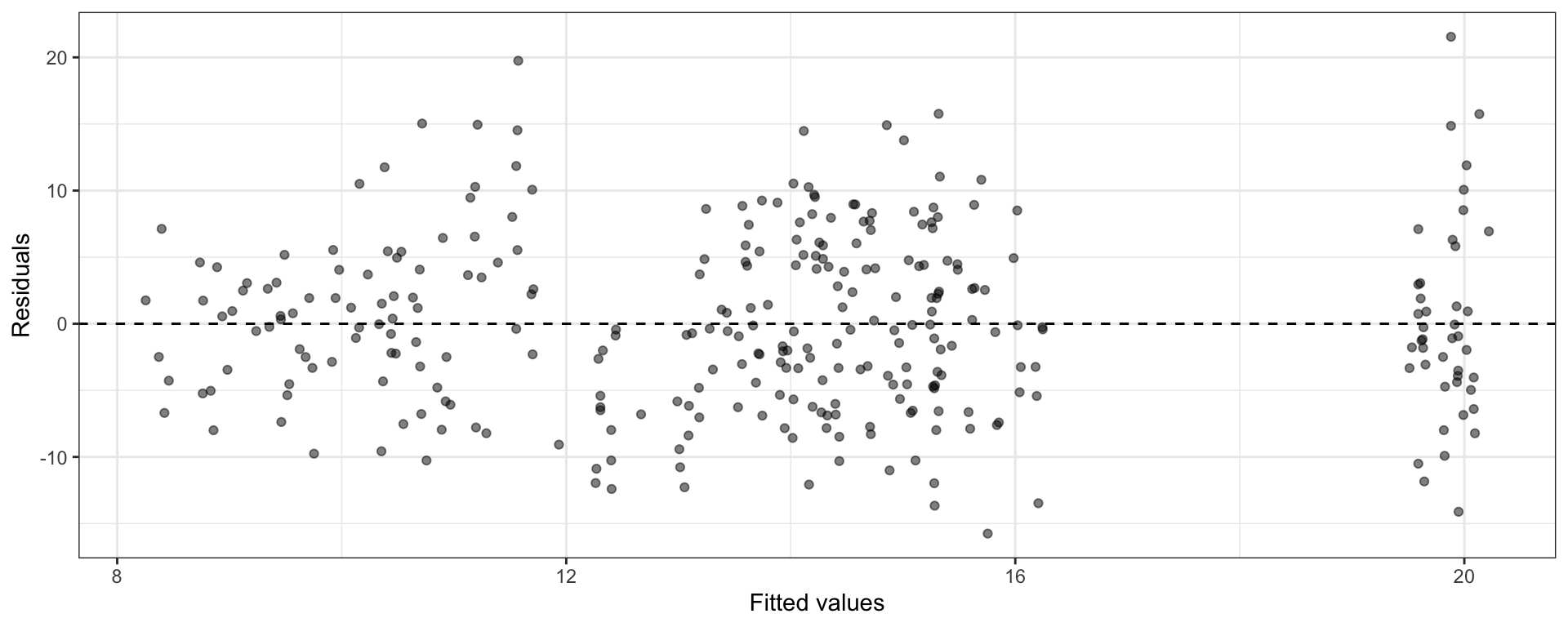
p_qq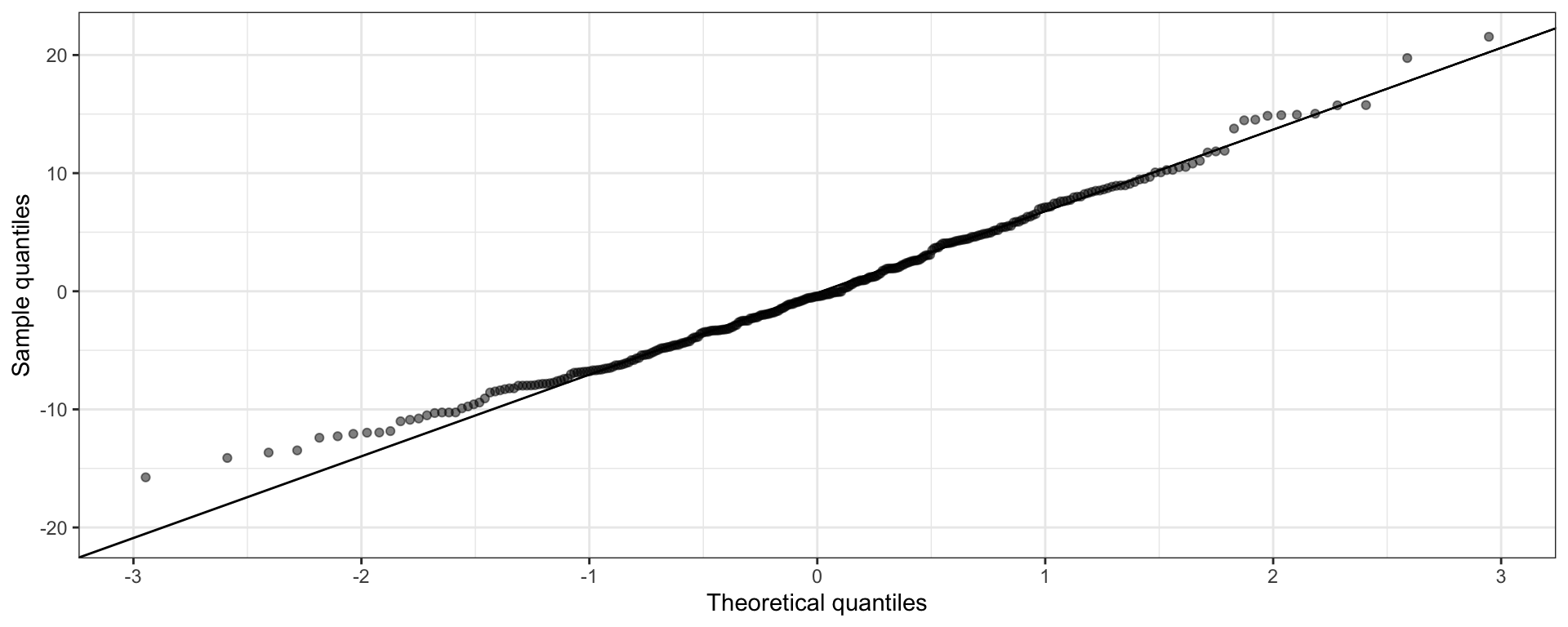
Saving model results
region_summary <- traits |>
  group_by(Region) |>
  summarise(n_trees = n(),
            across(all_of(fitness_traits),
                   list(mean = \(x) mean(x, na.rm = TRUE),
                        sd   = \(x) sd(x, na.rm = TRUE))),
            .groups = "drop")

write_csv(region_summary, here::here("results/region_trait_summary.csv"))
write_csv(pop_table,      here::here("results/population_table.csv"))
write_csv(broom::tidy(fit_both, conf.int = TRUE),
          here::here("results/lm_fitness_elevation_region.csv"))
write_csv() is the readr version of write.csv(). It never writes row names, so you no longer need row.names = FALSE. It is also faster and always writes UTF-8.
Putting it into a script
Collect the working code into src/02_wrangle_model_traits.R:
# 02_wrangle_model_traits.R: wrangle, plot, and model red spruce fitness traits
# Usage: Rscript src/02_wrangle_model_traits.R

# --- setup ---------------------------------------------------------------
suppressPackageStartupMessages({
  library(dplyr); library(tidyr); library(readr)
  library(ggplot2); library(purrr); library(forcats)
})

raw_file <- here::here("data/raw/red_spruce_fitness_traits.txt")
fig_dir  <- here::here("results/figures")
dir.create(fig_dir, recursive = TRUE, showWarnings = FALSE)

fitness_traits <- c("SeedWeight", "Germination", "Survival", "Height", "Fitness")

# --- load + clean --------------------------------------------------------
traits <- read_tsv(raw_file, show_col_types = FALSE) |>
  mutate(Region = fct_relevel(factor(Region), "C", "M", "E"))

stopifnot(nrow(traits) == 326, all(fitness_traits %in% names(traits)))

# --- wrangle -------------------------------------------------------------
traits_long <- traits |>
  pivot_longer(all_of(fitness_traits), names_to = "trait", values_to = "value")

region_summary <- traits |>
  group_by(Region) |>
  summarise(n_trees = n(),
            across(all_of(fitness_traits),
                   list(mean = \(x) mean(x, na.rm = TRUE),
                        sd   = \(x) sd(x, na.rm = TRUE))),
            .groups = "drop")

# --- plot ----------------------------------------------------------------
p_traits <- ggplot(traits_long, aes(Region, value, fill = Region)) +
  geom_boxplot(alpha = 0.6) +
  facet_wrap(~ trait, scales = "free_y", nrow = 2) +
  theme_bw() + theme(legend.position = "none")

ggsave(file.path(fig_dir, "traits_by_region.png"), p_traits,
       width = 10, height = 6, dpi = 300)

# --- model ---------------------------------------------------------------
fit_both <- lm(Fitness ~ Elevation + Region, data = traits)

# --- save ----------------------------------------------------------------
write_csv(region_summary, here::here("results/region_trait_summary.csv"))
write_csv(broom::tidy(fit_both, conf.int = TRUE),
          here::here("results/lm_fitness_elevation_region.csv"))

# --- provenance ----------------------------------------------------------
writeLines(capture.output(sessionInfo()),
           here::here("results/sessionInfo_02.txt"))
Two additions since Module 1. First, stopifnot() checks run straight after loading. If the raw file ever changes shape, the script stops right away with a clear message instead of producing quietly wrong figures. Second, a provenance file records the package versions that produced the results.
Wrap up
Idea check
Answer these in your own words, as comments at the top of src/02_wrangle_model_traits.R.
- What does
x |> f(y)translate to, and why dodplyrverbs chain together so naturally? - When would you use
group_by() |> summarise()instead ofgroup_by() |> mutate()? (Hint: how many rows does each return?) - Give one task that is easier with long data and one that is easier with wide data.
- After a
left_join(), your table has more rows than before. What happened, and how do you find the cause? - In
ggplot(), what is the difference betweenaes(colour = Region)andcolour = "blue"? - Why did the elevation slope shrink when
Regionwas added to the model? What does this have to do with population structure?
Practical exercises
Work through these in a fresh R session, then move the working code into src/02_wrangle_model_traits.R.
Exercise 1: Load, order, and label
Read the data with read_tsv(), set the Region factor order to C, M, E, and add a region_name column (Core, Margin, Edge) with a lookup-table join. Confirm the tree counts per region name.
Exercise 2: Filter, select, arrange
List the Edge-region trees with Fitness > 20, showing only Population, Elevation, Height, and Fitness, sorted from highest to lowest fitness. How many are there, and which populations do they come from?
Exercise 3: Elevation bands
Using case_when(), classify trees as low (< 500 m), mid (500–999 m), or high (≥ 1000 m). Report the number of trees and the mean Fitness and Height per band. Which population has no band, and why?
Exercise 4: Grouped summary with across()
For each Region, compute the number of trees and the mean and standard deviation of all five fitness traits in a single summarise() call. How many columns does the result have, and why?
Exercise 5: Reshape for a faceted plot
Pivot the five fitness traits to long format, then make a faceted histogram with one panel per trait and each panel on its own x-axis. Save it to results/figures/trait_histograms.png.
TipSolution
p_hist <- traits |>
  pivot_longer(all_of(fitness_traits), names_to = "trait", values_to = "value") |>
  ggplot(aes(x = value)) +
  geom_histogram(bins = 30, fill = "grey60", colour = "white") +
  facet_wrap(~ trait, scales = "free_x", nrow = 2) +
  labs(x = NULL, y = "Number of trees") +
  theme_bw()

p_hist
Warning: Removed 50 rows containing non-finite outside the scale range
(`stat_bin()`).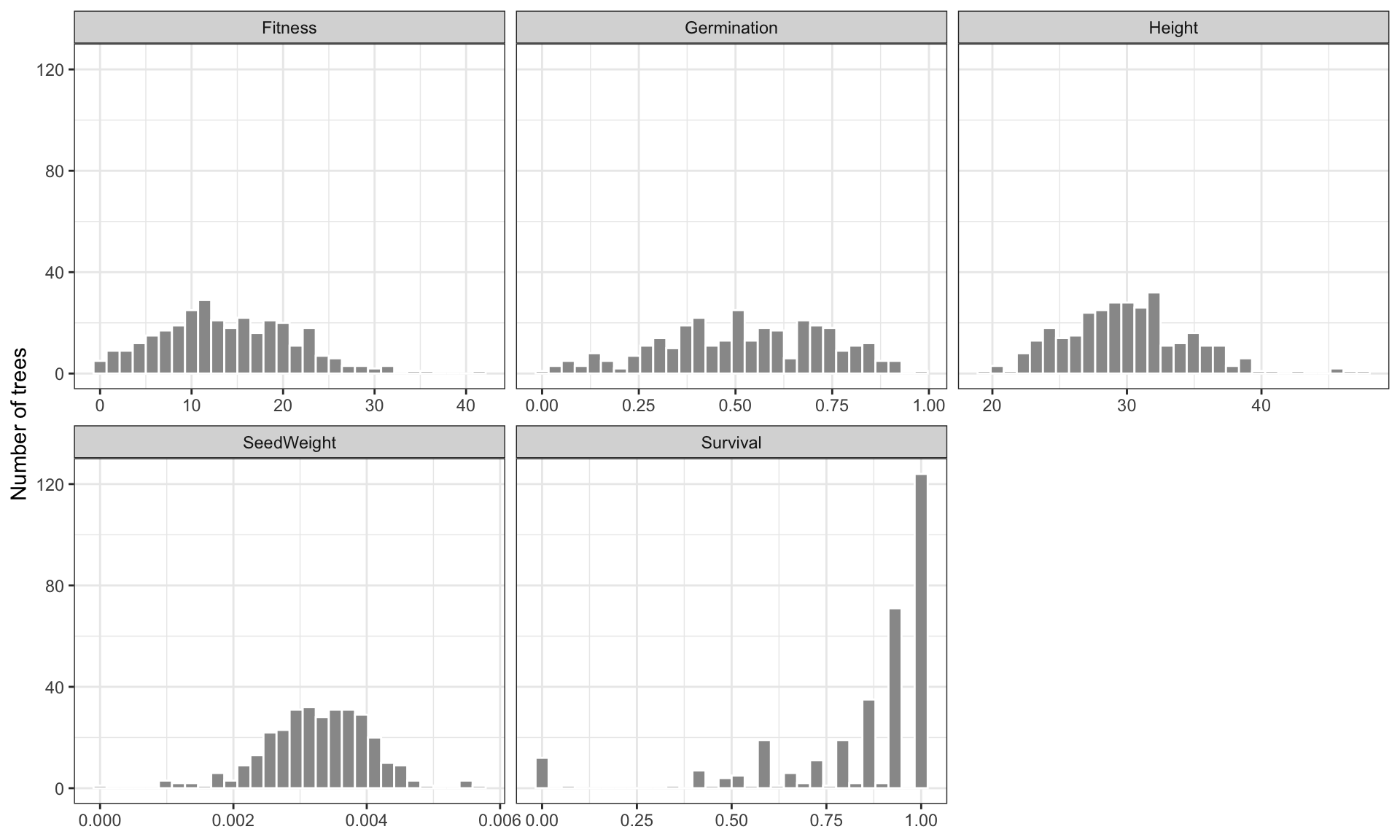
ggsave(here::here("results/figures/trait_histograms.png"), p_hist,
       width = 10, height = 6, dpi = 300)
Warning: Removed 50 rows containing non-finite outside the scale range
(`stat_bin()`).For histograms the trait value is on the x-axis, so the free scale is "free_x", not the "free_y" used for the boxplots. ggplot2 warns that it removed 50 rows. That is all the NAs across the five traits added up (12 + 12 + 1 + 13 + 12 = 50), a good check that the reshape worked. Notice how different the shapes are: Survival piles up near 1, while SeedWeight is skewed to the right.
Exercise 6: Population table and join
Build a population-level table with one row per population: the number of trees, mean Fitness, mean Elevation, and the three population-level genetic parameters. Check that the join neither added nor lost rows. What is the correlation between population mean fitness and Genetic_Diversity?
Exercise 7: A function, mapped over traits
Write a function region_test(data, trait) that fits lm(trait ~ Region) and returns a one-row tibble with the trait name, the model R², and the overall F-test p-value. Run it over all five fitness traits with map(). Which trait differs most between regions?
Exercise 8: Height model and confounding
Repeat the confounding analysis for Height: fit Height ~ Elevation and Height ~ Elevation + Region. Does the elevation slope change the way it did for Fitness?
Exercise 9: The reproducibility test
Run the clean-room test from Module 1 on your new script:
rm -rf results
Rscript src/02_wrangle_model_traits.R
ls -R results/Homework
- Make a publication-ready figure of
FitnessvsElevation: points coloured by region, one fitted line per region, labelled axes,theme_bw(). Save it as both.pngand.pdfinresults/figures/. - Compute each tree’s fitness relative to its population mean (
group_by()+mutate()), and plot the relative values by region. Which region has the most variation within populations? - Using
map(), fitFitness ~ Elevationseparately within each region. Report the slope per 100 m and its p-value for each region, and compare them with the pooled slope from the model section. - Write your interpretation as comments at the bottom of the script: is the elevation–fitness relationship mostly between regions, within regions, or both?
- Bonus (optional): combine the scatterplot and the faceted boxplot into one two-panel figure with the
patchworkpackage (p1 + p2).